Master Your Schedule with the Editable/Fillable August 2026 Calendar
A Practical Tool for Modern Planning
As we approach the mid-point of the decade, the need for organized, professional planning tools becomes paramount. The Editable/Fillable August 2026 Calendar is designed specifically for this purpose. It is not merely a template; it is a comprehensive design asset tailored for individuals and businesses who value precision and aesthetic appeal. This calendar serves as a bridge between raw data and actionable planning, offering a clean slate for the eighth month of 2026.
The package includes two critical formats to ensure maximum versatility. Users receive one editable and printable PDF file alongside one high-quality printable PNG file. This dual-format approach acknowledges the varied workflows of today’s professionals. Whether you prefer the interactive capabilities of Adobe Reader or the immediate tangibility of a printed image, this resource adapts to your specific operational needs. It is an essential component of any robust set of design assets for the upcoming year.
Visual Characteristics and Design Appeal
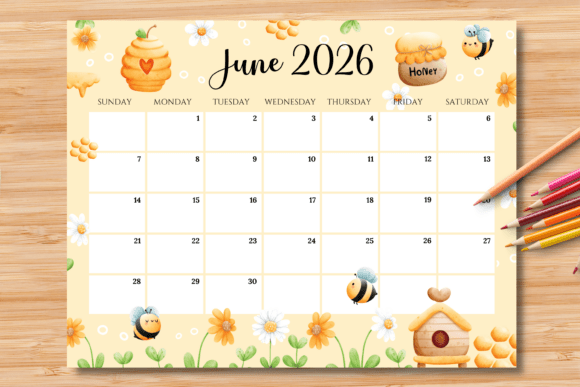
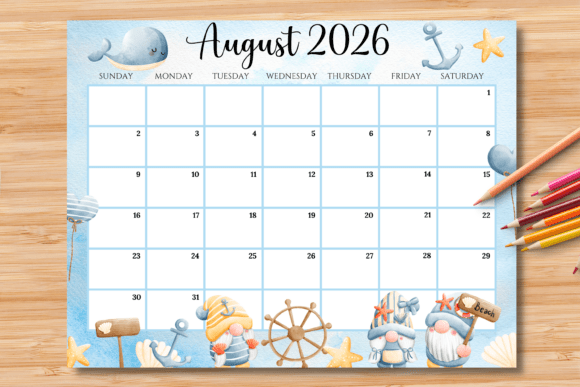
The personality of the Editable/Fillable August 2026 Calendar is rooted in modern typography and functional minimalism. The layout is optimized for US Letter size (11 x 8.5 inches) in a horizontal orientation. This landscape format is a deliberate choice, providing ample space for daily entries without the clutter often found in vertical layouts. The visual hierarchy is established through a clear distinction between the header elements and the daily grid, ensuring that the month and year are immediately recognizable while leaving the focus on the schedule itself.
While the core design features clean sans serif font aesthetics for the structure, the blue fillable boxes are the standout visual element. These interactive fields allow for personalization, transforming a static graphic into a dynamic tool. The style is professional yet approachable, making it suitable for both corporate environments and creative studios. The visual appeal lies in its restraint; it does not scream for attention but rather supports the content you place within it, much like a well-designed web layout supports its content.
Practical Applications Across Industries
The utility of this calendar extends across a wide spectrum of professional and personal applications. For entrepreneurs and small business owners, the August 2026 calendar is vital for Q3 planning. It allows for the mapping of product launches, marketing campaigns, and inventory cycles. The ability to edit the PDF digitally means that schedules can be adjusted on the fly and shared with teams via email or project management software.
For designers and content creators, the calendar functions as a content roadmap. It is ideal for planning social media graphics, editorial schedules, and publishing deadlines. The horizontal layout mimics the aspect ratio of many digital screens, making it easier to visualize how content will roll out across platforms. Bloggers can use it to track post schedules, while marketers can plot out email marketing sequences. The printable PNG format is particularly useful for creating mood boards or sticking a physical reminder above a workspace.
Furthermore, this tool serves the needs of crafters and hobbyists. Planning a busy month of family activities, school schedules, or creative projects requires a clear overview. The Editable/Fillable August 2026 Calendar provides that bird's-eye view, allowing for a balance between professional obligations and personal time.
How to Use and Customize Your Calendar
Getting started with this tool is straightforward, designed to minimize technical friction. There are two primary methods for utilizing the files.
Method 1: The Analog Approach
For those who prefer the tactile experience of writing, simply print the PDF or PNG file. The layout is optimized for standard inkjet or laser printers. Once printed, you can write down appointments, deadlines, and notes using a pen or pencil. This method is excellent for those who retain information better through handwriting or who prefer to disconnect from screens while planning.
Method 2: The Digital Workflow
This method leverages the interactive capabilities of the PDF file. Open the file in Adobe Reader, which is free software available on both Windows and Mac. You will notice blue boxes overlaid on the calendar grid. These are the editable fields. You can type your schedule directly into these boxes. The blue guide lines are designed to disappear upon printing, leaving you with a crisp, professional document.
Advanced Editing Instructions:
For those who wish to adjust the typography of their entries, the process involves a few simple steps. This works on a computer but is not supported on mobile devices or iPads.
- Open the PDF file in Acrobat Reader.
- Type your text into the blue boxes.
- Highlight the text you have entered.
- Press Ctrl+E on Windows or Command+E on Mac.
- A properties toolbar will appear, allowing you to change the font size, color, and style to match your brand identity.
It is important to note that only the text within the blue boxes can be modified. The structural elements, such as the grid lines and the "August 2026" header, are locked to preserve the integrity of the design.
Design Strategy and Brand Consistency
Using a high-quality, editable calendar contributes to broader brand identity efforts. Consistency is key in branding, and having planning documents that look professional—rather than hastily scribbled notes—can influence how you perceive your own workflow. When you treat your schedule as a design asset, you elevate the importance of the tasks written upon it.
The Editable/Fillable August 2026 Calendar allows for this level of professionalism. By adjusting the font properties to match your company's specific sans serif or serif font standards, you can create a cohesive look across all your internal planning documents. This is particularly useful for agencies or studios where planning documents might be shared with clients as part of a project timeline presentation.
Regarding technical specifics, users should be aware that printer color calibration may cause the blue guide boxes to appear slightly different on screen compared to paper. However, as noted, these boxes are not intended to be part of the final print when using the digital fill method. For the best results, ensure your printer settings are set to "Actual Size" or "100%" to maintain the correct margins and layout proportions for the US Letter size.
Final Thoughts on Utility
The Editable/Fillable August 2026 Calendar