Funeral Program Template: Create Meaningful Memorial Tributes
Losing someone you love is incredibly difficult, and the last thing you want to worry about during grief is formatting a document from scratch. That’s where a thoughtfully designed Funeral Program Template comes in. It provides a structured, beautiful starting point for creating an obituary program or memorial brochure that truly honors a life well-lived. Instead of struggling with design software while emotions are high, you get a polished, professional framework that lets you focus on what matters most: celebrating memories.
Understanding the Design and Structure
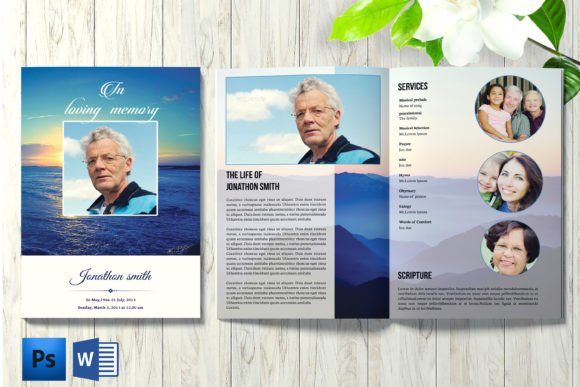
This particular memorial program template is built as a practical, four-page brochure. The dimensions are 11x8.5 inches, which is a standard size for folding nicely into a program that guests can hold. At 300 dpi resolution and in CMYK color mode, it’s ready for high-quality professional printing, ensuring photos and text look crisp. The 0.25-inch bleed is already set up, which is a small but crucial detail that prevents unwanted white edges after trimming.
What makes this funeral program template stand out is its editable nature. Every single text element and graphic can be customized. You aren’t locked into a specific color scheme or font style. The files come organized and color-coded, which simplifies the editing process considerably. Whether you’re working in Adobe Photoshop (CS6 or newer) or Microsoft Word, the working files are provided. A help file with font download links is included, so you can match the exact typography used in the preview if you choose.
Why a Professional Template Matters for Memorials
A well-crafted obituary program does more than list event details. It sets the tone for the service and serves as a tangible keepsake for attendees. Using a premium design asset like this template elevates the entire presentation. It communicates care and respect through clean layout, balanced typography, and thoughtful visual hierarchy. When the design is handled, you can pour your energy into writing heartfelt words, selecting meaningful photos, and gathering stories from family and friends.
For those who aren't professional designers, this approach is a lifeline. It removes the guesswork of alignment, font pairing, and spacing. The structure guides you through placing the order of service, an obituary, pallbearers, and acknowledgments in a logical, easy-to-read flow. This consistency helps guests follow along during the service and creates a cohesive memento they’ll keep for years.
Practical Applications and Customization Tips
This template’s versatility is one of its greatest strengths. While it’s designed as a funeral program, its clean, modern typography and neutral style make it adaptable. You could use it as a base for a celebration of life event, a memorial service, or even a more formal funeral. The editable graphics allow you to incorporate religious symbols, floral motifs, or simple elegant borders that reflect the personality of the person being remembered.
When customizing, start with the text. Replace the placeholder names, dates, and details with your own. Then, consider the photos. High-resolution images work best. The template’s layout likely includes designated spots for a cover portrait and interior images. Pay attention to the font styles used in the original design. Using a complementary serif font for body text and a clean sans serif for headings can enhance readability. The included help file will point you to the exact typefaces, but if you decide to change them, choose fonts that are legible and respectful in tone.
Choosing and Using Your Memorial Program
Selecting a funeral program template is a personal decision. Look for one whose visual style resonates with the feeling you want to convey. Is it traditional and solemn, or modern and celebratory? This specific template leans toward a versatile, professional design that can be adapted to either tone through your choice of colors, photos, and wording.
Once you’ve customized the file, the next step is printing. Because it’s set up in CMYK with bleed, you can send it directly to a professional print shop. Discuss paper stock with them—often a heavier, matte paper feels substantial and appropriate. For a more personal touch, you could print them on a high-quality home printer, but ensure your settings match the template’s specifications for the best results.
Remember, this is not a mockup. It’s a functional, editable document. The models shown in the preview are for demonstration only and are not included. Your final product will feature your own photos and text, making it a unique tribute. If you encounter any issues or need a custom modification beyond what you can do yourself, the creator offers contact support, which is a valuable resource for a project this important.
Creating a memorial program is an act of love. Having the right tools makes that process less stressful and more focused on honoring a life. A reliable, well-designed template provides the professional foundation you need, allowing your personal touches to shine through beautifully.